> ## Documentation Index
> Fetch the complete documentation index at: https://help.lunacal.ai/llms.txt
> Use this file to discover all available pages before exploring further.
# Embed Your Event In Mails
> Use this to add clickable time slots inside emails so recipients can confirm a meeting in one step. You’ll work from “Embed” and use “Add to Email” to generate slots that open your booking flow.
## Step 1
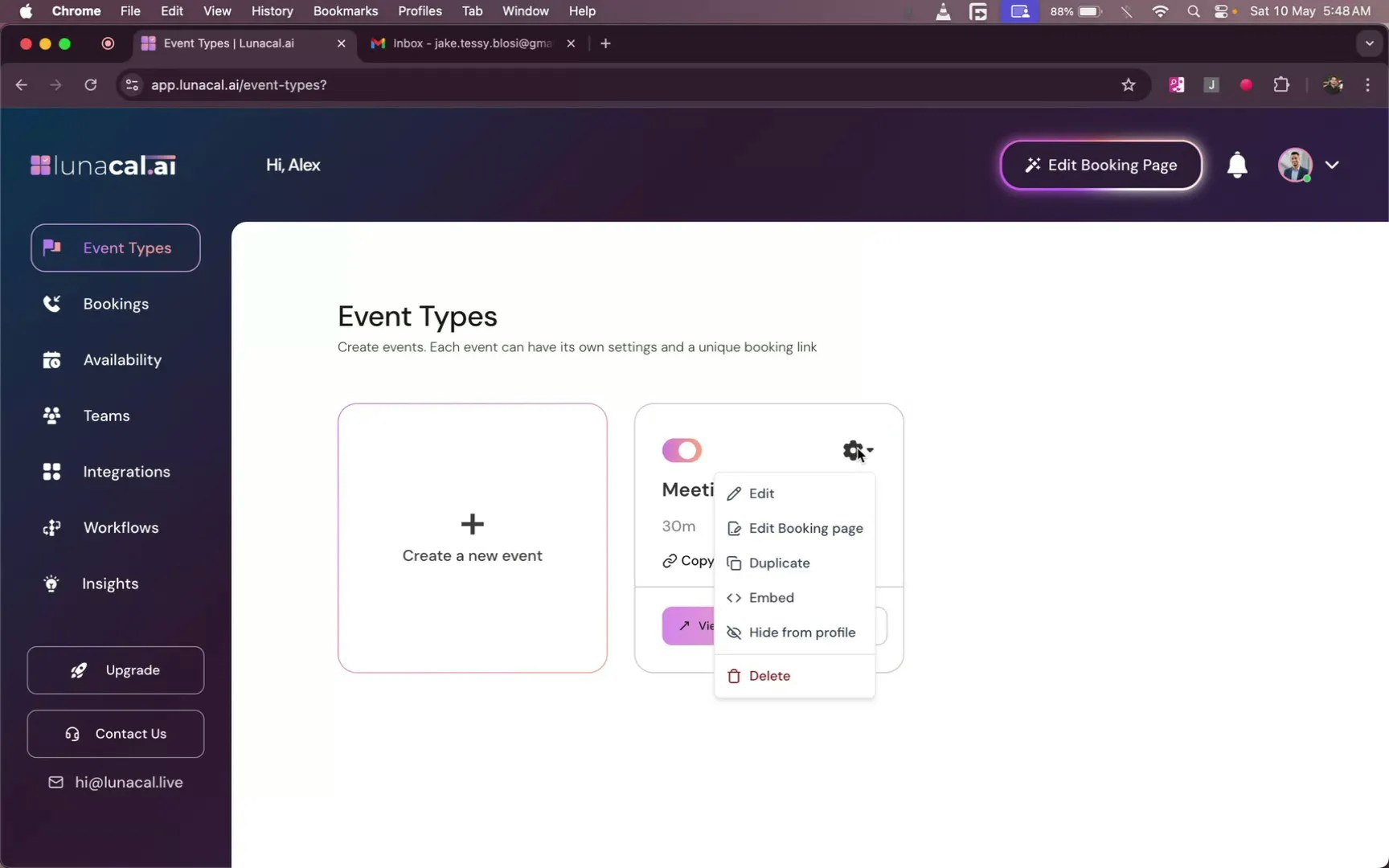
Navigate to [event types](https://app.lunacal.ai/event-types) (e.g., a 30-minute meeting). Click the settings button, then choose “**Embed**”.
## Step 2
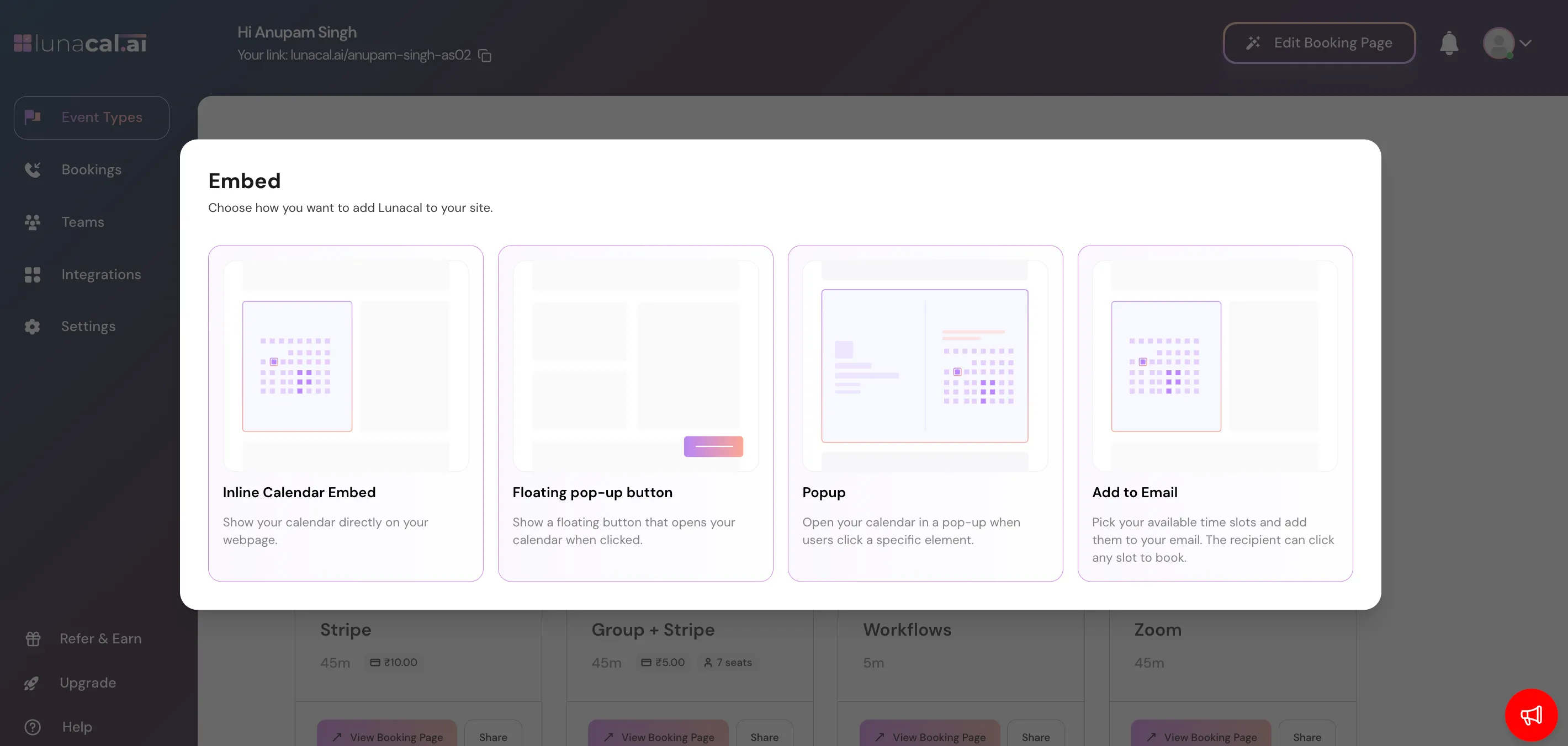
Next, you will be presented with 4th options, Click on "**Add to Email**" to proceed to the relevant page.
## Step 3
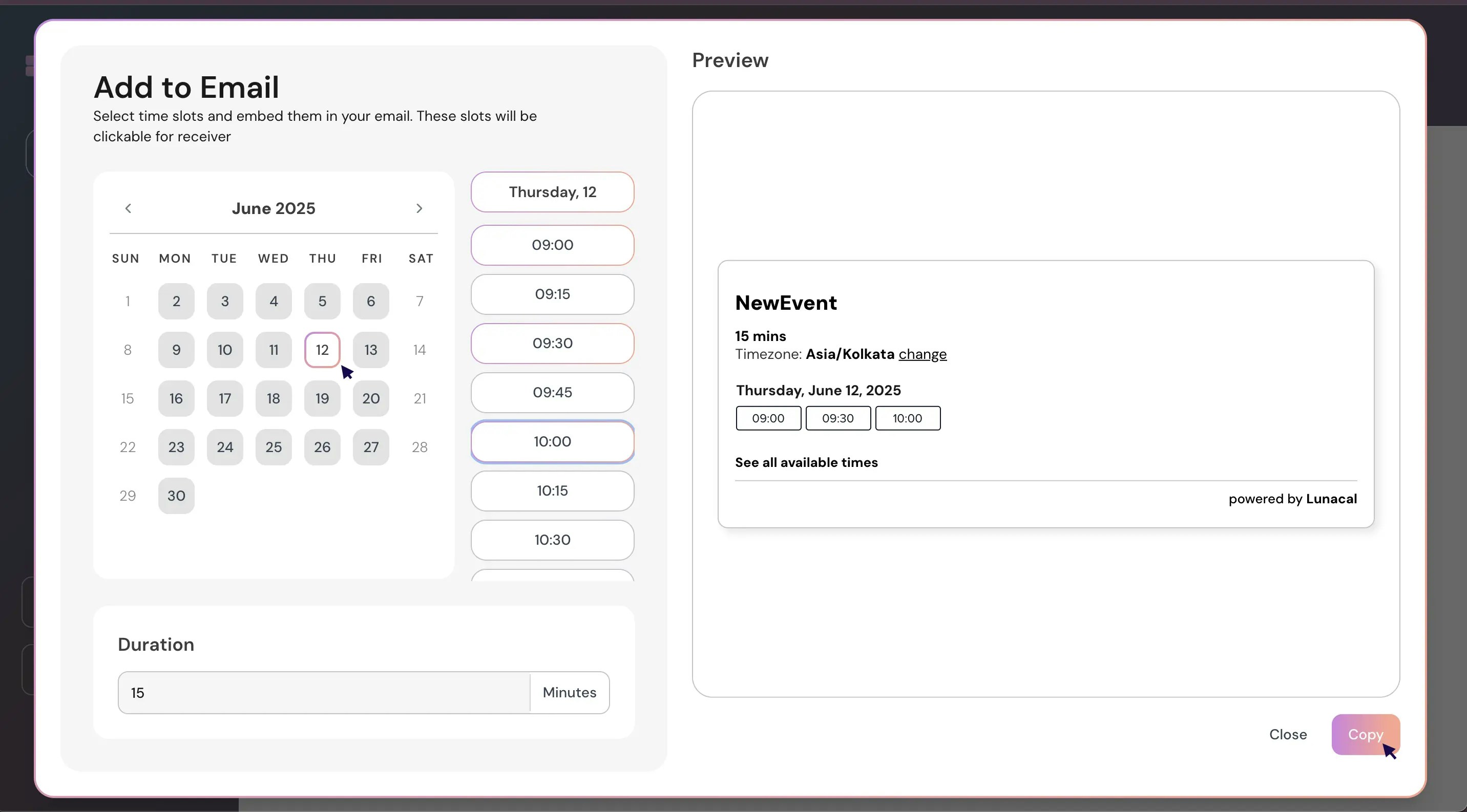
Select the date(s) and time slots you want to share (e.g., 12th at 9:00, 09:30, 10:00), then click “**Copy**”.\
**Example**: A consultant shares three morning slots for quick discovery calls so clients can choose without back-and-forth.
## Step 4
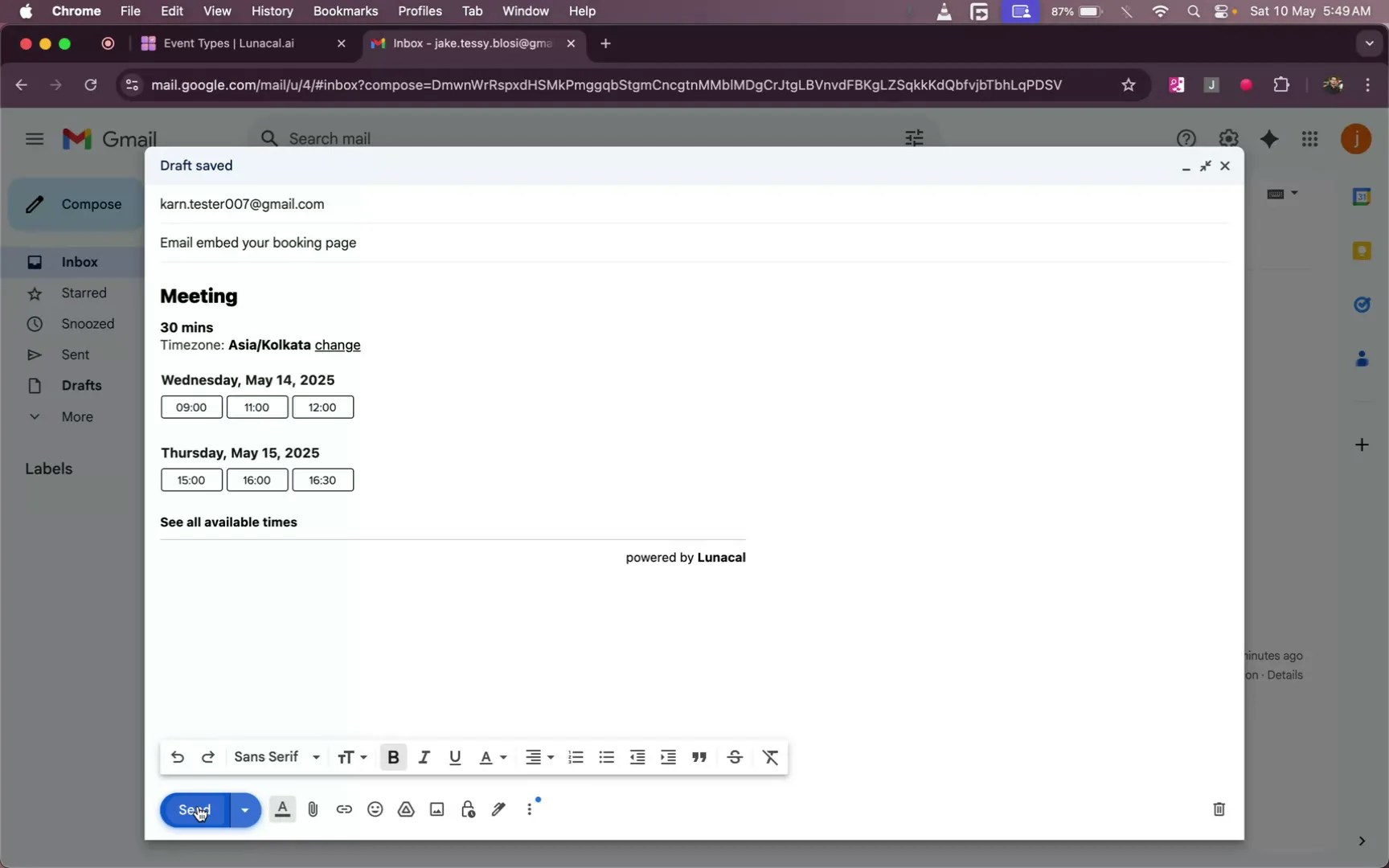
Paste the copied slots into your email body where you want them to appear.\
**Example**: A recruiter pastes two days of options near the top of the email so candidates see them immediately.
## Step 5
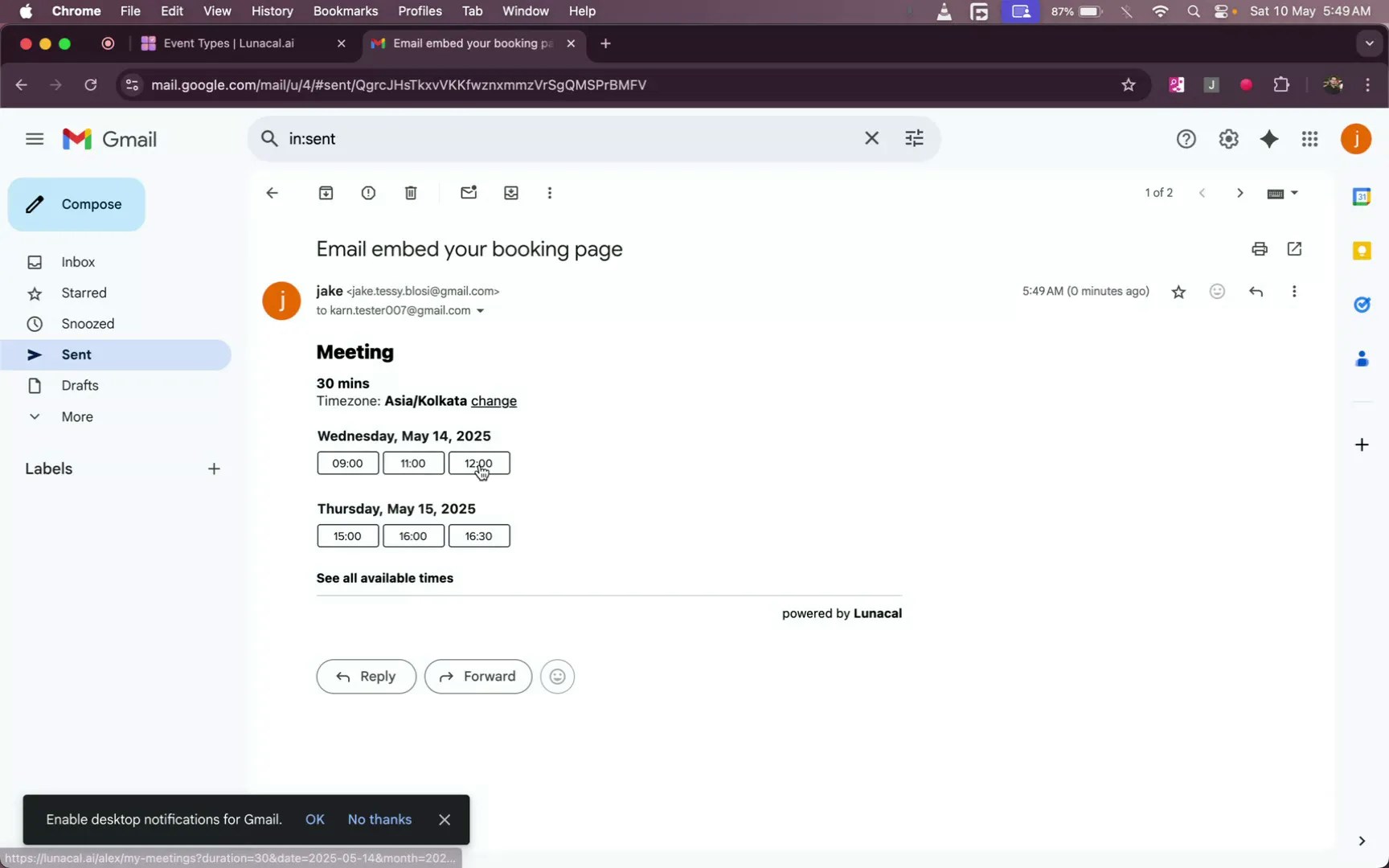
Recipients click a time slot in the email to select their preference.\
**Example**: A support lead drops slots into a follow-up email—users click once and skip manual coordination.
## Step 6
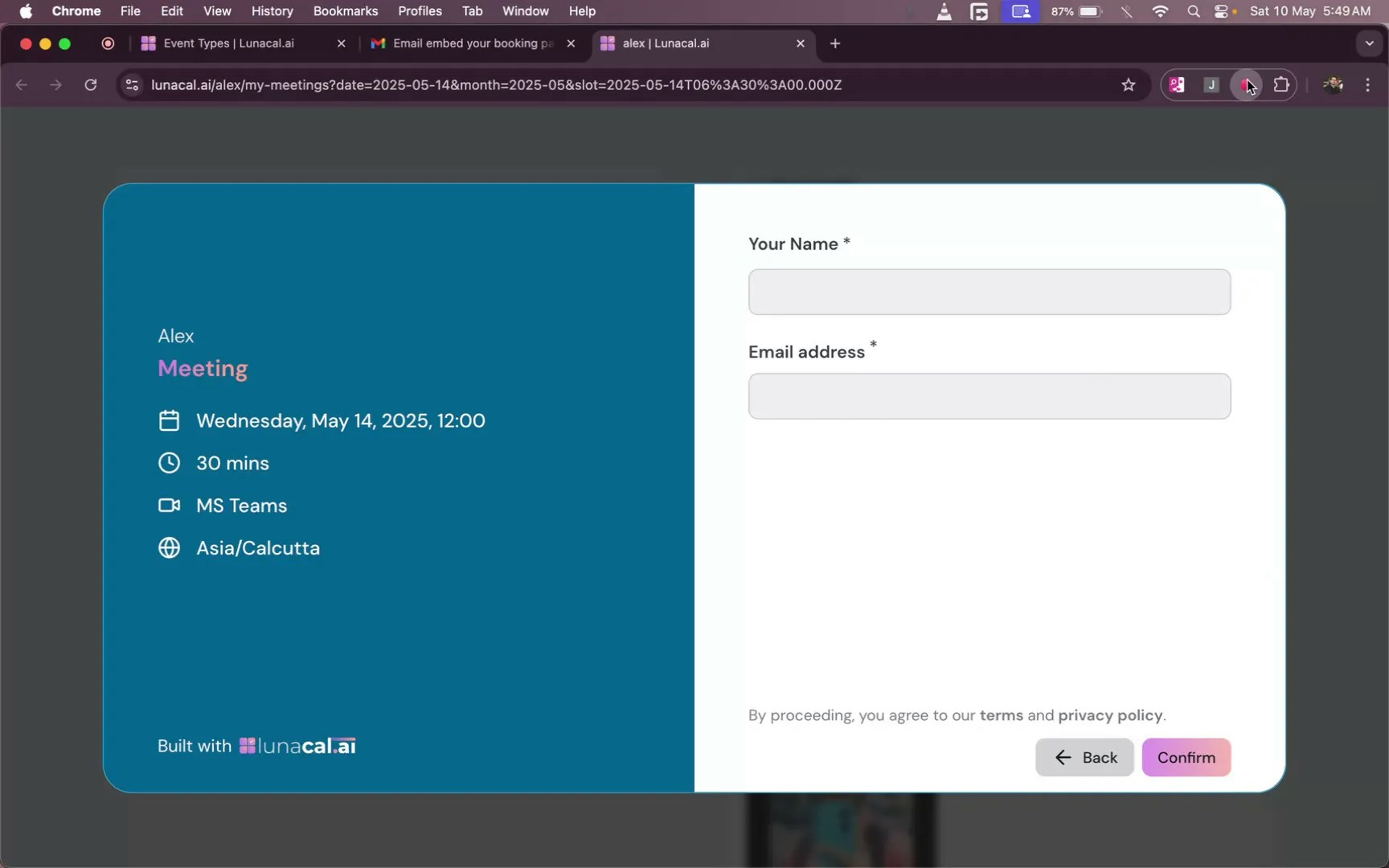
After clicking a slot, recipients enter their name and email, then click “**Confirm**” to finalize the booking.\
**Example**: An agency sends options to a new lead; once they hit “Confirm,” the calendar invite is created automatically.
**Common mistakes to avoid**
* Pasting into a plain-text email (links may break). Use a rich-text editor or your email tool’s default compose window.
* Sharing too many slots across many days, which overwhelms the reader. Keep choices focused.
* Reusing old slot blocks after you change availability; always generate fresh slots from “Add to Email”.
* Mixing different event types in one email, which confuses recipients about duration and details.
**Good defaults to start with**
* Offer 3–5 slots across 1–2 days to keep decisions simple.
* Place the slot block high in the email so it’s visible without scrolling.
* If most clients prefer mornings, share slots in your best-responding hours first.
* Test by sending the email to yourself once to confirm links and formatting.
 ## Step 2
Next, you will be presented with 4th options, Click on "**Add to Email**" to proceed to the relevant page.

## Step 3
Select the date(s) and time slots you want to share (e.g., 12th at 9:00, 09:30, 10:00), then click “**Copy**”.\
**Example**: A consultant shares three morning slots for quick discovery calls so clients can choose without back-and-forth.
## Step 2
Next, you will be presented with 4th options, Click on "**Add to Email**" to proceed to the relevant page.

## Step 3
Select the date(s) and time slots you want to share (e.g., 12th at 9:00, 09:30, 10:00), then click “**Copy**”.\
**Example**: A consultant shares three morning slots for quick discovery calls so clients can choose without back-and-forth.
 ## Step 4
Paste the copied slots into your email body where you want them to appear.\
**Example**: A recruiter pastes two days of options near the top of the email so candidates see them immediately.
## Step 4
Paste the copied slots into your email body where you want them to appear.\
**Example**: A recruiter pastes two days of options near the top of the email so candidates see them immediately.
 ## Step 5
Recipients click a time slot in the email to select their preference.\
**Example**: A support lead drops slots into a follow-up email—users click once and skip manual coordination.
## Step 5
Recipients click a time slot in the email to select their preference.\
**Example**: A support lead drops slots into a follow-up email—users click once and skip manual coordination.
 ## Step 6
After clicking a slot, recipients enter their name and email, then click “**Confirm**” to finalize the booking.\
**Example**: An agency sends options to a new lead; once they hit “Confirm,” the calendar invite is created automatically.
## Step 6
After clicking a slot, recipients enter their name and email, then click “**Confirm**” to finalize the booking.\
**Example**: An agency sends options to a new lead; once they hit “Confirm,” the calendar invite is created automatically.
 **Common mistakes to avoid**
* Pasting into a plain-text email (links may break). Use a rich-text editor or your email tool’s default compose window.
* Sharing too many slots across many days, which overwhelms the reader. Keep choices focused.
* Reusing old slot blocks after you change availability; always generate fresh slots from “Add to Email”.
* Mixing different event types in one email, which confuses recipients about duration and details.
**Good defaults to start with**
* Offer 3–5 slots across 1–2 days to keep decisions simple.
* Place the slot block high in the email so it’s visible without scrolling.
* If most clients prefer mornings, share slots in your best-responding hours first.
* Test by sending the email to yourself once to confirm links and formatting.
**Common mistakes to avoid**
* Pasting into a plain-text email (links may break). Use a rich-text editor or your email tool’s default compose window.
* Sharing too many slots across many days, which overwhelms the reader. Keep choices focused.
* Reusing old slot blocks after you change availability; always generate fresh slots from “Add to Email”.
* Mixing different event types in one email, which confuses recipients about duration and details.
**Good defaults to start with**
* Offer 3–5 slots across 1–2 days to keep decisions simple.
* Place the slot block high in the email so it’s visible without scrolling.
* If most clients prefer mornings, share slots in your best-responding hours first.
* Test by sending the email to yourself once to confirm links and formatting.