> ## Documentation Index
> Fetch the complete documentation index at: https://help.lunacal.ai/llms.txt
> Use this file to discover all available pages before exploring further.
# Event-Specific Widgets
> Event-Specific Widgets let you control which widgets appear on which event types on your booking page. By default, all widgets (Gallery, Videos, Audio, Documents, About section, Testimonials, etc.) appear across every event type. This feature gives you granular control — so each event can have its own customized experience.
## Overview
By default, all widgets (Gallery, Videos, About, Testimonials, Documents, etc.) are shown across **every event type**.
If you have multiple events, they all share the same widget layout.
Event-Specific Widgets allow you to decide:
> Which widget appears on which event.
## Where to Find It
1. Open your **Edit Booking Page** Editor
-1.webp?fit=max&auto=format&n=AOKKArpDs5svQ93Z&q=85&s=e4c5d84077ba343eb47307a9d1ae2dfc) 1. Click **Settings** in the top navigation bar
You’ll see:
* **Show Widgets**
* **Allow Event-Specific Widgets**
1. Click **Settings** in the top navigation bar
You’ll see:
* **Show Widgets**
* **Allow Event-Specific Widgets**
-1.webp?fit=max&auto=format&n=AOKKArpDs5svQ93Z&q=85&s=997e72e55e485677cd191953d9f17dbd) ## Setting 1: Show Widgets (Global Toggle)
This controls widgets for the entire booking page.
* **Enabled** → All added widgets are visible
* **Disabled** → No widgets appear on any event and your calendar will be center alligned.
This is the master visibility switch.
## Setting 1: Show Widgets (Global Toggle)
This controls widgets for the entire booking page.
* **Enabled** → All added widgets are visible
* **Disabled** → No widgets appear on any event and your calendar will be center alligned.
This is the master visibility switch.
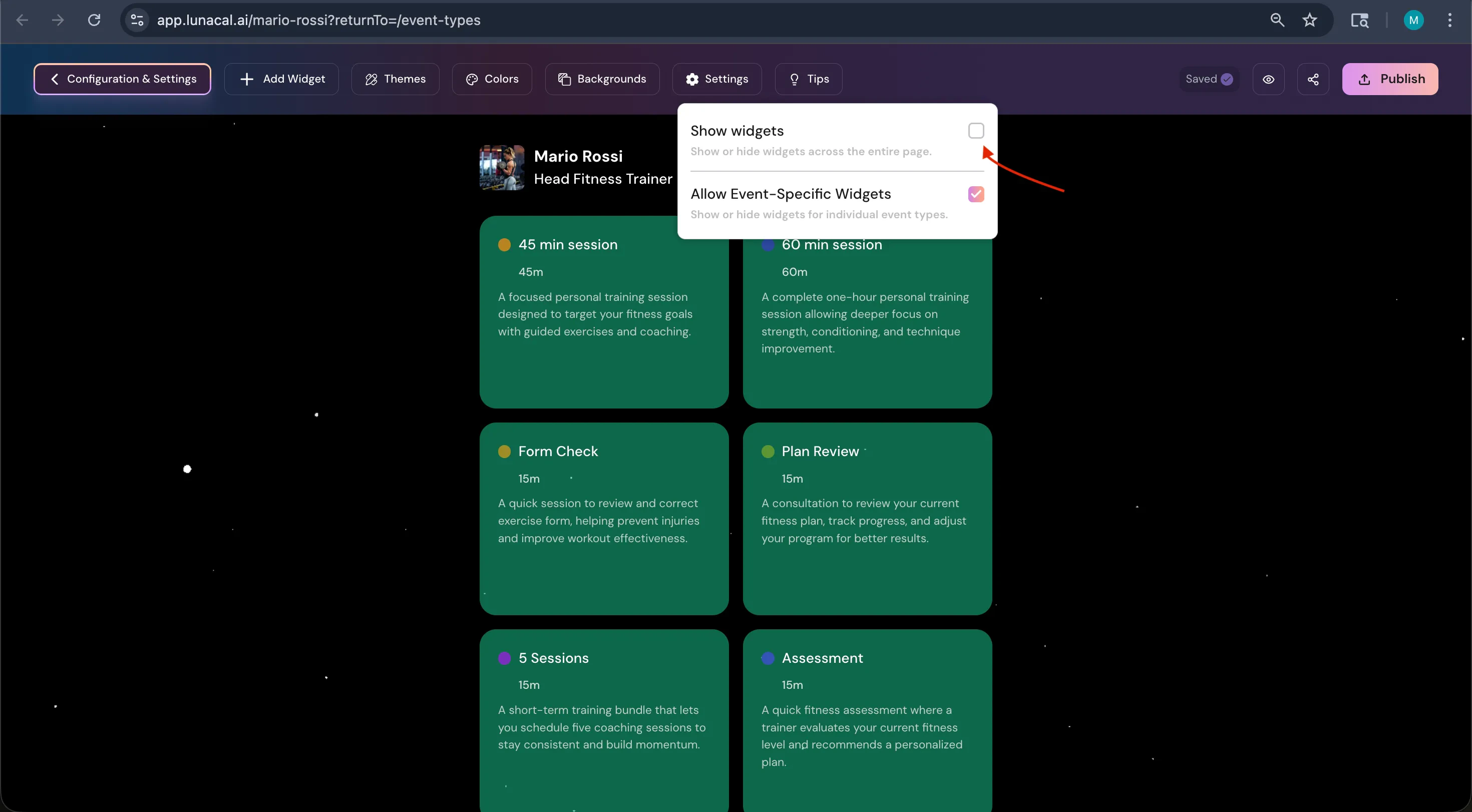 ## Setting 2: Allow Event-Specific Widgets
When disabled (default):
* Every event type shows the same widgets.
When **enabled**:
* An **eye icon** appears on each widget.
* You can control visibility per event type.
## Setting 2: Allow Event-Specific Widgets
When disabled (default):
* Every event type shows the same widgets.
When **enabled**:
* An **eye icon** appears on each widget.
* You can control visibility per event type.
-1.webp?fit=max&auto=format&n=AOKKArpDs5svQ93Z&q=85&s=b01ba9e1e0a8282cdeb228576f541617)
-1.webp?fit=max&auto=format&n=AOKKArpDs5svQ93Z&q=85&s=59558a6ca8d11323d8e6cffeaf64045b) ## How It Works
After enabling **Allow Event-Specific Widgets**:
1. Go to your widgets list.
2. Click the 👁 icon on a widget.
3. Select the event types where it should appear.
4. **Publish**.
That widget will now appear only on selected events.
## Example
You have 4 events:
* 1:1 Consultation
* Webinar
* Portfolio Review
* Corporate Demo
You can configure:
* Consultation → About + Testimonials
* Webinar → Videos + Documents
* Portfolio Review → Gallery only
* Corporate Demo → About + Documents
Each event now has a tailored booking experience.
## When to Use This
Use Event-Specific Widgets if:
* You run different types of events
* Each event needs different supporting content
* You want cleaner, more focused booking pages
* You want higher conversion through relevance
## Summary
| Setting | Function |
| :--------------------------- | :------------------------------- |
| Show Widgets | Turns all widgets on or off |
| Allow Event-Specific Widgets | Enables per-event widget control |
If you want, tell me what tone Lunacal uses (technical, friendly, startup-style, minimal), and I’ll rewrite it properly aligned with your product voice.
## How It Works
After enabling **Allow Event-Specific Widgets**:
1. Go to your widgets list.
2. Click the 👁 icon on a widget.
3. Select the event types where it should appear.
4. **Publish**.
That widget will now appear only on selected events.
## Example
You have 4 events:
* 1:1 Consultation
* Webinar
* Portfolio Review
* Corporate Demo
You can configure:
* Consultation → About + Testimonials
* Webinar → Videos + Documents
* Portfolio Review → Gallery only
* Corporate Demo → About + Documents
Each event now has a tailored booking experience.
## When to Use This
Use Event-Specific Widgets if:
* You run different types of events
* Each event needs different supporting content
* You want cleaner, more focused booking pages
* You want higher conversion through relevance
## Summary
| Setting | Function |
| :--------------------------- | :------------------------------- |
| Show Widgets | Turns all widgets on or off |
| Allow Event-Specific Widgets | Enables per-event widget control |
If you want, tell me what tone Lunacal uses (technical, friendly, startup-style, minimal), and I’ll rewrite it properly aligned with your product voice.