> ## Documentation Index
> Fetch the complete documentation index at: https://help.lunacal.ai/llms.txt
> Use this file to discover all available pages before exploring further.
# Subscriptions (Autopay)
> Charge your clients automatically on a repeating schedule — weekly, monthly, or any cadence you choose — and let each payment unlock a set number of sessions they can book.
## What it does
With Subscriptions turned on for an event type:
* Your client pays **when they first subscribe**, then gets **charged automatically** every cycle after that — no reminders or manual invoices needed from you.
* Each time they're billed, they get a fresh batch of sessions to book (you decide how many).
* Everything runs through **Stripe**, so payments, retries, and receipts are handled for you.
This is a great fit for coaching retainers, memberships, recurring lessons, or any "pay monthly, book as you go" setup.
## Before you turn it on
A few things need to be true first:
* **You need Stripe connected** as your payment method — Subscriptions doesn't work with PayPal or free events.
* **You need a price set** under "Charge for this event" — it has to be more than \$0.
* Your event type **can't** be a collective event (multiple hosts sharing bookings).
* Your event type **can only have one duration option** — Subscriptions doesn't work with multiple session lengths.
* You **can't** combine it with a flexible-count package or with deposit payments — turning Subscriptions on will automatically switch deposits off.
If any of these aren't met, you'll see a message explaining what to fix when you try to enable it.
## Setting it up
1. Go to the event type → **Payments** tab.
2. Make sure **Stripe** is selected and a price is set.
3. Turn on **Enable subscription (autopay)**.
4. Choose your **billing frequency** — how often to charge (every 1 day, 2 weeks, 1 month, 1 year, etc.).
5. Set **sessions per billing cycle** — how many bookings each payment unlocks (1 to 20). If you leave it at 1, your client gets one session per payment.
6. Save.
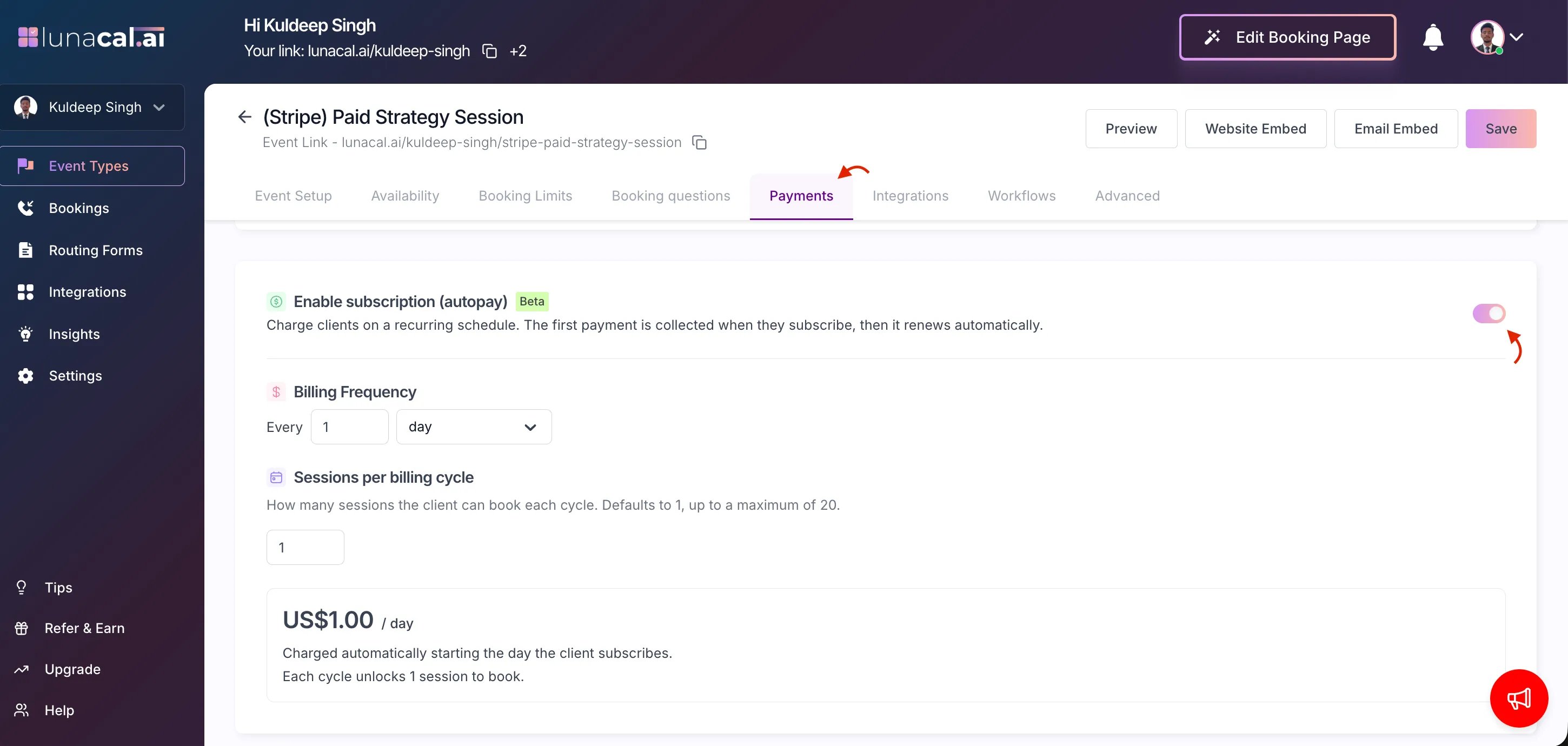 That's it — your event's booking page will now show it as a subscription instead of a one-time booking.
**Note:** while Subscriptions is on, the separate Packages & Recurring tab is hidden, since session counts are configured right here instead.
## What your client sees
When they visit your booking page:
* The price is shown per cycle, like `$49 / month`.
* They'll see a note that it renews automatically and how many sessions they get each time.
* Instead of "Book," the button says **Subscribe**.
At checkout, they're told clearly that this is a recurring charge and that it continues automatically until they cancel.
Once they pay:
* Their subscription becomes active.
* Their first batch of sessions is unlocked immediately, and they can start booking.
## Coupons
You can apply a discount code to a subscription, and choose whether it applies:
* **First payment only** — full price kicks back in from the second cycle onward, or
* **Every payment** — the discount applies for as long as they stay subscribed.
One limit: a **100% off** coupon can't be used on a subscription — some discount has to still leave a charge.
## Renewals
Every time the billing cycle repeats:
* Stripe charges your client automatically.
* If the payment goes through, they get their next batch of sessions right away, and may get a "sessions ready to book" email.
* **Unused sessions from the previous cycle don't roll over** — it's a fresh allotment each time, so let your clients know this if they tend to book less than what they're allotted.
We also send your client a heads-up before they're charged again:
| Billing frequency | Reminder sent |
| ----------------- | --------------------- |
| Weekly | 1 day before renewal |
| Monthly | 3 days before renewal |
| Yearly | 7 days before renewal |
| Daily | No advance reminder |
## Cancelling
Either you or your client can cancel a subscription. Either way:
* **Cancellation takes effect at the end of the current billing period** — not immediately.
* Your client keeps their remaining sessions and access until then.
* They won't be charged again.
If someone wants to come back later, they'll see a **Subscribe again** option.
## Managing subscriptions
**As a host:** Go to your **Bookings** list → **Subscriptions** tab. There you can see each subscriber's status, when they renew or end, sessions left, total paid, and full payment history — and cancel a subscription from there if needed.
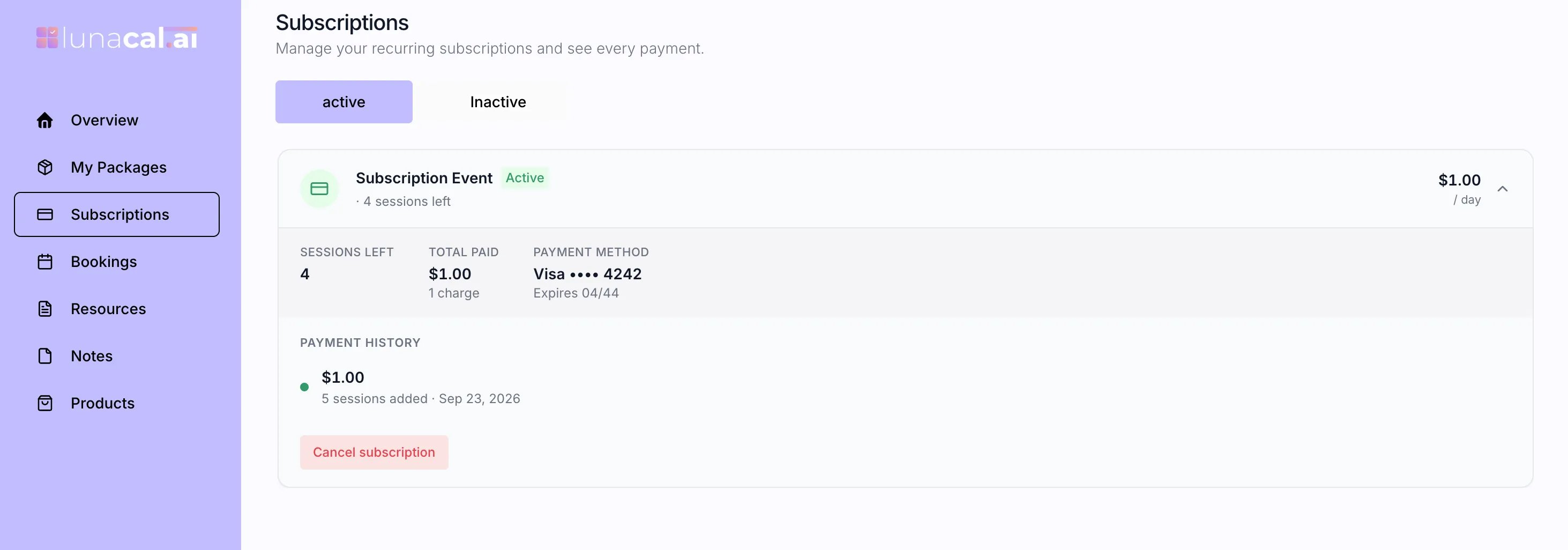
**As a client:** They manage everything from [Client Portal](https://app.lunacal.ai/package/subscriptions)`/package/subscriptions` in their account — an **Active** tab and an **Inactive** tab, showing sessions left, next renewal date, saved payment method, payment history, and the option to cancel or resubscribe.
That's it — your event's booking page will now show it as a subscription instead of a one-time booking.
**Note:** while Subscriptions is on, the separate Packages & Recurring tab is hidden, since session counts are configured right here instead.
## What your client sees
When they visit your booking page:
* The price is shown per cycle, like `$49 / month`.
* They'll see a note that it renews automatically and how many sessions they get each time.
* Instead of "Book," the button says **Subscribe**.
At checkout, they're told clearly that this is a recurring charge and that it continues automatically until they cancel.
Once they pay:
* Their subscription becomes active.
* Their first batch of sessions is unlocked immediately, and they can start booking.
## Coupons
You can apply a discount code to a subscription, and choose whether it applies:
* **First payment only** — full price kicks back in from the second cycle onward, or
* **Every payment** — the discount applies for as long as they stay subscribed.
One limit: a **100% off** coupon can't be used on a subscription — some discount has to still leave a charge.
## Renewals
Every time the billing cycle repeats:
* Stripe charges your client automatically.
* If the payment goes through, they get their next batch of sessions right away, and may get a "sessions ready to book" email.
* **Unused sessions from the previous cycle don't roll over** — it's a fresh allotment each time, so let your clients know this if they tend to book less than what they're allotted.
We also send your client a heads-up before they're charged again:
| Billing frequency | Reminder sent |
| ----------------- | --------------------- |
| Weekly | 1 day before renewal |
| Monthly | 3 days before renewal |
| Yearly | 7 days before renewal |
| Daily | No advance reminder |
## Cancelling
Either you or your client can cancel a subscription. Either way:
* **Cancellation takes effect at the end of the current billing period** — not immediately.
* Your client keeps their remaining sessions and access until then.
* They won't be charged again.
If someone wants to come back later, they'll see a **Subscribe again** option.
## Managing subscriptions
**As a host:** Go to your **Bookings** list → **Subscriptions** tab. There you can see each subscriber's status, when they renew or end, sessions left, total paid, and full payment history — and cancel a subscription from there if needed.
**As a client:** They manage everything from [Client Portal](https://app.lunacal.ai/package/subscriptions)`/package/subscriptions` in their account — an **Active** tab and an **Inactive** tab, showing sessions left, next renewal date, saved payment method, payment history, and the option to cancel or resubscribe.
 ## Common questions
**Why can't I turn autopay on?** Check that: Stripe is your payment method, you've set a price above \$0, the event isn't collective, it only has one duration, and you're not using a flexible-count package. Also make sure the event type isn't locked by a team admin.
**What's the difference between Packages and Subscriptions?** Packages are a one-time upfront payment for a set (or flexible) number of sessions. Subscriptions charge automatically on a repeating schedule and refresh the session count each cycle. You can't use both at once.
**Do unused sessions carry over to the next cycle?** No — each renewal gives a fresh batch, regardless of what was left over.
**Can my client cancel mid-cycle and get a refund?** They can cancel anytime, but it only takes effect at the end of the period they've already paid for — they keep access until then rather than losing it immediately. Refunds aren't handled automatically as part of cancelling.
**Can I accept PayPal for a subscription?** No — Stripe only.
**Can I use a 100%-off coupon?** No, subscriptions require some payment to go through each cycle.
**What's the maximum sessions per cycle?** 20 per cycle. Clients can book up to 10 slots in a single booking action.
**Where do I see my subscribers?** Bookings → **Subscriptions** tab.
**Where does my client manage their subscription?** `/package/subscriptions` in their account, under Active or Inactive.
## Common questions
**Why can't I turn autopay on?** Check that: Stripe is your payment method, you've set a price above \$0, the event isn't collective, it only has one duration, and you're not using a flexible-count package. Also make sure the event type isn't locked by a team admin.
**What's the difference between Packages and Subscriptions?** Packages are a one-time upfront payment for a set (or flexible) number of sessions. Subscriptions charge automatically on a repeating schedule and refresh the session count each cycle. You can't use both at once.
**Do unused sessions carry over to the next cycle?** No — each renewal gives a fresh batch, regardless of what was left over.
**Can my client cancel mid-cycle and get a refund?** They can cancel anytime, but it only takes effect at the end of the period they've already paid for — they keep access until then rather than losing it immediately. Refunds aren't handled automatically as part of cancelling.
**Can I accept PayPal for a subscription?** No — Stripe only.
**Can I use a 100%-off coupon?** No, subscriptions require some payment to go through each cycle.
**What's the maximum sessions per cycle?** 20 per cycle. Clients can book up to 10 slots in a single booking action.
**Where do I see my subscribers?** Bookings → **Subscriptions** tab.
**Where does my client manage their subscription?** `/package/subscriptions` in their account, under Active or Inactive.